AI Chatbot for Flipbooks: How Interactive Documents Are Changing Publishing
Readers don't want to scroll 40 pages to find one answer. An AI chatbot embedded in your flipbook answers their questions from your content. Here's how it works and why it matters.
Disclosure: Flipebooks builds the AI chatbot described in this article. We've limited every claim to what the product actually does today, and we link to an independent AI feature comparison so you can see how other tools compare.
For two decades, digital publishing has chased one goal: make a PDF look better on a screen. Page-flip animations, zoom, embedded video — all of it polishes how a document looks. None of it changes the underlying deal: you publish, the reader scrolls, and the moment they have a question, they're on their own.
That deal is starting to break. The same technology behind conversational AI now fits inside a published document, so the reader can simply ask — and get an answer drawn from your content, not from the open internet. It's a small shift with large consequences for catalogs, manuals, reports, and any document people read to make a decision.
The problem: your best content can't answer a single question
Think about the last 30-page catalog or product brochure you opened. You weren't reading it cover to cover. You had a specific question — Does this model support X? What's the warranty? Is there a version for outdoor use? — and you started hunting.
In a static document, hunting means scrolling, pinching to zoom, and skimming headings until you either find the answer or give up. On mobile, most people give up. That's a quiet failure: the answer was in the document the whole time, but the format buried it.
Search boxes help a little, but they only match keywords. They don't understand that "is it weatherproof" and "IP65 rated" are the same question. And they certainly don't summarize an answer that's spread across three pages.
What an AI chatbot for flipbooks actually is
An AI chatbot for flipbooks is a small chat panel embedded in the document viewer. The reader types a question in plain language; the AI answers using the text extracted from your flipbook — and only your flipbook.
That last part matters. A general-purpose chatbot will happily invent a warranty policy or quote a price it pulled from training data. A document-grounded chatbot reads the actual pages of your publication and answers from them. If the answer isn't in the document, a well-built chatbot says so instead of guessing.
In Flipebooks, the chatbot is grounded in the extracted text of each page, and it's told to stay there: it answers questions about the document's content and politely declines anything outside that scope. No hallucinated facts, no off-topic detours.
See it in action
Here's a real exchange from a published product brochure. The reader asks a direct question; the chatbot answers from the document and offers to go deeper.
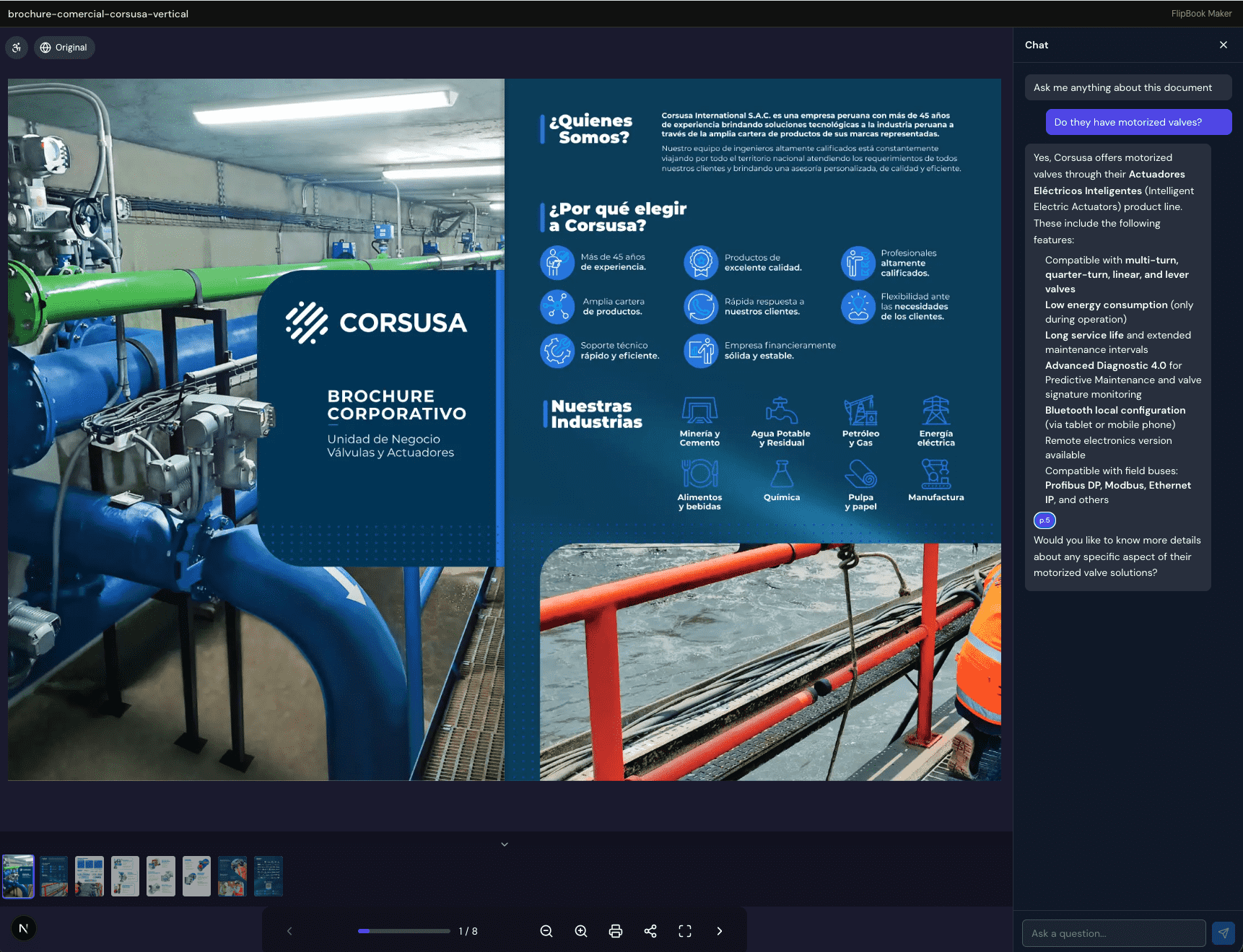
Reader: Do they have motorized valves?
Chatbot: Yes — the company offers motorized valves through its intelligent electric actuator line. These include multi-turn, quarter-turn, linear and lever types, with low energy consumption, long service life, Advanced Diagnostic 4.0 for predictive maintenance, Bluetooth local configuration, and fieldbus compatibility (Profibus DP, Modbus, Ethernet/IP and others). Would you like more detail on any specific aspect?
Notice what didn't happen: the reader didn't scroll, didn't open a separate search, and didn't leave the document. The answer was assembled from the brochure's own pages and delivered in a sentence. Because the chatbot reads page by page, it can also point readers toward the section an answer came from.
How it works — three steps
You don't need to train a model or write code. The whole setup lives in the editor.
- Enable the chatbot. Open your flipbook in the editor, go to Chatbot settings, and toggle it on.
- Readers click the chat icon. A floating chat button appears in the viewer. Clicking it opens a side panel where readers type questions.
- The AI answers in real time. Responses stream in word by word, drawn from your flipbook's content — the same conversational feel as messaging a person.
You set the guardrails
A document chatbot is only useful if it behaves the way you want. Flipebooks gives you two controls that ship with every chatbot:
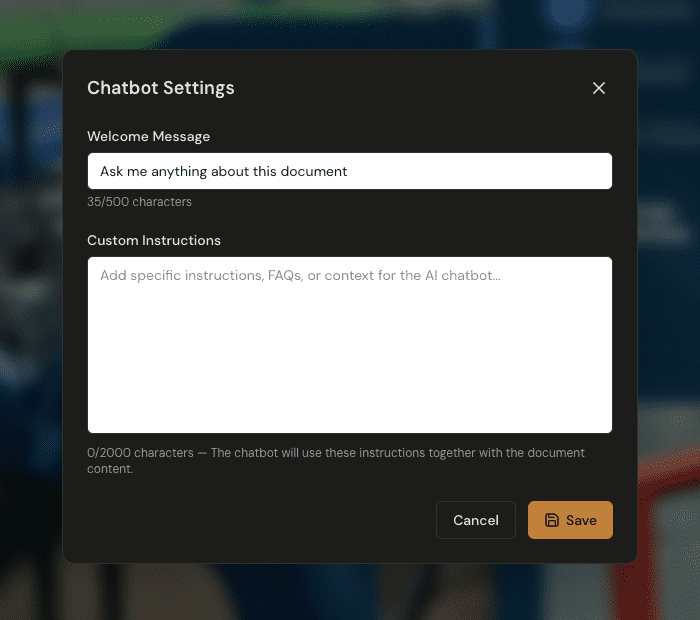
- A welcome message (up to 500 characters) — the first thing readers see, like "Ask me anything about this document."
- Custom instructions (up to 2,000 characters) — your own guidance that the chatbot follows alongside the document. Tell it to stay strictly on topic, to recommend a specific product line, to surface your FAQs first, or to answer only in a certain tone.
You define the boundaries; the AI works inside them. That's the difference between a helpful assistant on your catalog and a generic bot that wanders off-script.
Why this changes publishing
When a document can answer questions, the job of the document changes. It stops being a thing people read and starts being a thing people interrogate. A few places where that shift pays off:
- Product catalogs. Shoppers ask about specs, compatibility, and availability without leaving the page — exactly the moment they're closest to a decision.
- Technical manuals. "How do I reset it?" gets an answer in seconds instead of a support ticket.
- Real estate brochures. Buyers ask about square footage, fees, or finishes and get instant, document-backed answers.
- Course materials and reports. Students and stakeholders query dense PDFs conversationally instead of skimming for the one paragraph that matters.
- Marketing collateral. Every brochure becomes a lightweight lead-qualification surface — the questions readers ask tell you what they actually care about.
The thread through all of these: engagement stops leaking. Instead of bouncing to Google (and maybe to a competitor), the reader stays inside your document and gets what they came for.
We're not the only ones doing this
Document AI is an industry trend, not a single-vendor trick, and it's worth being straight about that. FlipHTML5, for example, also offers a book chatbot that answers from the publication's text and cites page numbers. Other platforms offer none. We keep a running, independently verified tally in our AI flipbook features comparison.
Where Flipebooks differs is the surrounding AI feature stack. The chatbot isn't a bolt-on; it sits alongside automatic WCAG accessibility (alt-text and reading order), AI visual translation that redraws pages in a new language, and analytics insights that tell you how readers actually behave. The chatbot answers questions; the rest of the stack makes the document readable, global, and measurable.
Built-in limits keep it safe and affordable
"Add an AI chatbot" sounds expensive and risky. Two design choices keep it neither:
- It stays on your document. The chatbot answers from your content and declines questions outside it. That removes the most common failure mode of public-facing AI — confidently wrong answers about things you never published.
- It's rate-limited by design. Each visitor session is capped at 50 messages per hour, and each plan includes a monthly token quota (1M tokens on Professional, 3M on Premium). No surprise bills from a scraper hammering your chatbot overnight.
The chatbot is available on the Professional and Premium plans. You can see exactly what each tier includes on the pricing page.
Frequently asked questions
Does the chatbot make up answers?
No. It's grounded in the text extracted from your flipbook and instructed to answer only from that content. If a question falls outside the document, it says so instead of guessing.
Do readers need an account to use it?
No. The chat panel is part of the public viewer — anyone you share the flipbook with can ask questions. Usage is capped at 50 messages per hour per visitor session to prevent abuse.
Which plans include the AI chatbot?
The chatbot is available on Professional and Premium. Each plan includes a monthly token quota — 1M tokens on Professional, 3M on Premium. See the pricing page for the full breakdown.
Can I stop it from going off-topic?
Yes — twice over. The chatbot already declines questions outside your document, and you can add custom instructions (up to 2,000 characters) to steer its tone, priorities, and what it should emphasize.
How is this different from pasting my PDF into a general AI tool?
A general tool answers from wherever its training data points, and it lives outside your document. A flipbook chatbot lives inside the published document your reader is already viewing, answers only from it, and asks nothing of the reader beyond typing a question.
Try it on your own flipbook
The fastest way to understand a document chatbot is to watch it answer a question about your content. Upload a PDF, turn your flipbook into something readers can talk to, and enable the chatbot from the editor.
Static documents made information available. Conversational documents make it answerable — and that's the version of publishing your readers already expect. Learn more about the AI chatbot feature, or start with a free flipbook today.